Monday, 4 June 2018

Salesforce - setting opportunity targets for use on actual v target reports

Having attempted to use Salesforce's collaborative forecasting solution, which seemed perfect for indivudual quota(targets) agaisnt actual closed won amounts, i found there was an issue when trying to report actual amounts against group targets, product groups (if different from product family), company regions and using a different currency field other than opportunity amount.

There are paid for apps that provide extra flexibility, but i thought i could make use of custom summary formula and a clever way of using an opportunity formula field to set the targets.  This solutions means no extra objects are required and no need to use collaborative forecasting.

My final result displayed on the dashboard looks like this:

steps to reproduce:

1 - to set the targets on a monthly basis throughout the year:

create a formula(number) field on opportunity product


our release_code_1 field is a date field for when money is collected so for every product sold this field is populated and means we can use month() to put that value as a month value and then use case to allocate the monthly target values

2 - create report

create a opportunity / opportunity product report type with the new rd__c field included

set the main filters to all opportunities/date field as revenue release date and the date range to current cy

apply any additional filters as appropriate

in the matrix/summary report row grouping is the date field (group this field by month) and in column grouping use sum of amount or sum of net value before vat (from product) - it is here that you add custom summary formula - which i called monthly target:

your matrix would like this:


3 - add a chart on the report

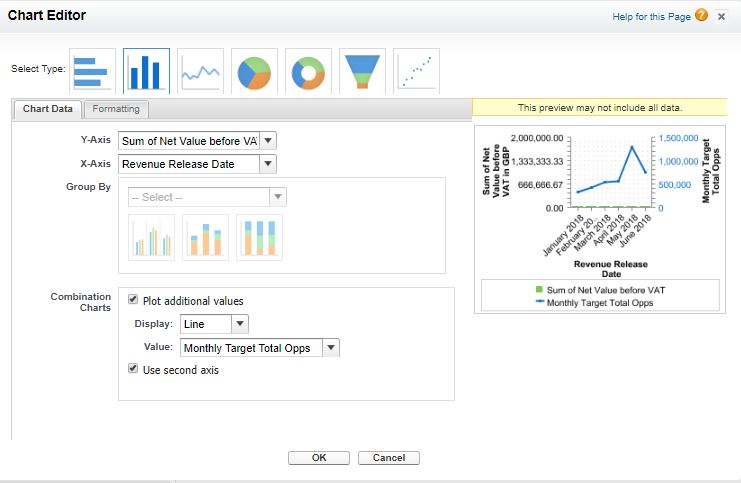
for chart data you can use sum of net value or sum of amount depending on how you have previous customised currenct data in either opportunity/opportunity-products, x axis would be the date field you use in the report then check plot additional fields where display is line and value is monthly target (custom summary formula) also check use second axis

for formatting, add the legend to the bottom, check show axis label and check enable hover, also set the y-axis to manula starting at 0 and ending with the same value as the second axis (this ensures the two y axis align)  if you dont do this your target will look like its below the actual when actually the figures say target hasn't been achieved


that is it - easy 

and feel free to comment

i am actually working on a better solution where i am building a quota object where its the parent object of opportunity via a lookup on opportunity.   in this object will be the target value, the opp owner, and a rollup of opportunity amount and other currency fields on opp/opp product as well as product divisions and company regions.  i will elaborate further when that is complete, but obviously this will require code to pull data on to quota__c from opportunity and opportunity product........watch this space

Thursday, 13 October 2016

Apex - Trigger.old and trigger.new comparison

trigger contacttrigger on contact (before delete) {
    for (customobject__C coj : [SELECT Contactlookup__c
                                      FROM contactrelatedobject__c
                                      WHERE Contactlookup__c
                                      IN :Trigger.oldMap.keySet()]) {
        Trigger.oldMap.get(coj.contactlookup__c).addError(
                   'Cannot delete contact with a contactrelatedobject record');
    }
}

Apex - create master-detail records

master(parent) - account

detail(child) - contact


 Creating a Child Record When a Parent Record is Created

You want to automatically create a new child record when you create a parent record. The child record should be populated with default values from contact.


trigger AutoCreatecontact on account (after insert) {
    List<contact> cons = new List<contact>();

  
    for (account newacc: Trigger.New) {
        if (newacc.customfield__c != null) {
            cons.add(new contact(
                        Name = 'Iain',
                        account = newacc.Id,
                        contactcustomfield__c = newacc.customfield__c,
                        another_contactcustomfield__c = 'Yes'));
        }
    }
    insert cons;
}


Wednesday, 12 October 2016

Apex - loops

Loops are used when a particular piece of code should be repeated with desired number of iteration.

FOREACH loops let you repeatedly execute code on every element of a list:

List<Contact> allContacts = [SELECT Id FROM Contact];

for (Contact currentContact : allContacts) {
    

    currentContact.customfield__c = 'customvalue';


FOR loops  lets you repeatedly execute code a specific number of times:


for (Integer i = 0; i < 5; i++) {

    
    Contact newcontact = new Contact();
    newcontact.FirstName = 'Iain';
    newcontact.LastName  = 'Banks #' + i;
    newcontact.customfield__c = 'customvalue';
    insert newcontact;
}

FOR LOOP:
syntax - 
for (variable : list_or_set) { code_block }

List<apex_invoice__c> PaidInvoiceNumberList = new List<apex_invoice__c>();
//initialising list of object records 


PaidInvoiceNumberList = [SELECT Id,Name, APEX_Status__c FROM APEX_Invoice__c  WHERE CreatedDate = today]; 
//SOQL query to find filter records


List<string> InvoiceNumberList = new List<string>();
//list to store paid invoice


for (APEX_Invoice__c objInvoice: PaidInvoiceNumberList) { 

//loop iterates (executes repeatedly) on the PaidInvoiceNumberList and will process the each record (objInvoice)

if (objInvoice.APEX_Status__c == 'Paid') { 
//this if condition will check each record for the boolean condition


InvoiceNumberList.add(objInvoice.Name);
//if Status value is paid then it will add the invoice number into List of String
}
}

SOQL FOR LOOP:
This type of for loop is used when we don't want to create the List and directly iterate over the returned set of records of SOQL query.


Syntax - 
for (variable : [soql_query]) { code_block }
OR
for (variable_list : [soql_query]) { code_block }

the variable_list or variable should always be of same type as the records returned by the Query

List<apex_invoice__c> PaidInvoiceNumberList = new List<apex_invoice__c>();
//initialising list of object records 

List<string> InvoiceNumberList = new List<string>();
//list to store paid invoice

for (APEX_Invoice__c objInvoice: [SELECT Id,Name, APEX_Status__c FROM APEX_Invoice__c  WHERE CreatedDate = today]) { 

//this loop will iterate and will process the each record returned by the Query

if (objInvoice.APEX_Status__c == 'Paid') { 
//this if condition will check each record for the boolean condition


InvoiceNumberList.add(objInvoice.Name);
//if Status value is paid then it will add the invoice number into List of String
}
}

JAVA FOR LOOP:
Syntax - 
for (init_stmt; exit_condition; increment_stmt) { code_block }

List<apex_invoice__c> PaidInvoiceNumberList = new List<apex_invoice__c>();
//initialising list of object records 

List<string> InvoiceNumberList = new List<string>();
//list to store paid invoice

for (Integer i = 0; i < paidinvoicenumberlist.size(); i++) { 

//this loop will iterate on the List PaidInvoiceNumberList and will process the each record. It will get the List Size and will iterate the loop for number of times that size. For example, list size is 10.

if (PaidInvoiceNumberList[i].APEX_Status__c == 'Paid') { 
//this if condition will check each record for the boolean condition


InvoiceNumberList.add(PaidInvoiceNumberList[i].Name);
//if Status value is paid then it will add the invoice number into List of String
}

}

WHILE LOOP:
Syntax - 
while (Boolean_condition) { execute_code_block }

//Fetch 20 records from database
List<apex_invoice_c> InvoiceList = [SELECT Id, APEX_Description_c, APEX_Status_c FROM APEX_Invoice_c LIMIT 20];
Integer i =1;
//Update ONLY 10 records
while (i< 10) {
InvoiceList[i].APEX_Description__c = 'This is the '+i+'Invoice';

i++;

}

DO WHILE LOOP:
syntax - 
do { code_to_execute } while (Boolean_condition);


//Code for do while loop
List<apex_invoice__c> InvoiceList = [SELECT Id, APEX_Description__c, APEX_Status__c FROM APEX_Invoice__c LIMIT 20];//it will fetch only 20 records
Integer i =0;
do {
InvoiceList[i].APEX_Description__c = 'This is the '+i+' Invoice';

i++;//Increment the counter
}while (i< 1); 

//iterate till 1st record only

Sunday, 11 September 2016

Apex - Usefull trigger to maintain the relationship between custom objects related to Lead to Account/Contact/Opp after Lead Conversion


trigger LeadConvertCustomObjects on Lead (before update) {
//This trigger will associate Custom Object records with the Account, Contact, and/or      opportunity associated to the
//lead after it has been converted.
//The Custom Object is associated to an opportunity only if an opportunity record exist on the Lead.
for (Integer i = 0; i < Trigger.new.size(); i++){
    if (Trigger.new[i].IsConverted == true && Trigger.old[i].isConverted == false){
        Set<Id> leadIds = new Set<Id>();
        for (Lead lead : Trigger.new)
            leadIds.add(lead.Id);

        Map<Id, DocuSign_Account__c> entries_DSA = new Map<Id, DocuSign_Account__c>([select Account__c, Lead__c from DocuSign_Account__c where lead__c in :leadIds]);      
        if(!Trigger.new.isEmpty()) {
            for (Lead lead : Trigger.new)  {
                for (DocuSign_Account__c DSA : entries_DSA.values()) {
                    if (DSA.Lead__c == lead.Id) {
                        // DSA.contact__c = lead.ConvertedContactId;
                        // DSA.opportunity__c = lead.ConvertedOpportunityId;
                        DSA.account__c = lead.ConvertedAccountId;
                        update DSA;
                        // break;
                    }
                }
            }
        }

        Map<Id, DocuSign_Account_Member__c> entries_DSAM = new Map<Id, DocuSign_Account_Member__c>([select Contact__c, Lead__c from DocuSign_Account_Member__c where lead__c in :leadIds]);      
        if(!Trigger.new.isEmpty()) {
            for (Lead lead : Trigger.new)  {
                for (DocuSign_Account_Member__c DSAM : entries_DSAM.values()) {
                    if (DSAM.Lead__c == lead.Id) {
                        DSAM.Contact__c = lead.ConvertedContactId;
                        // DSAM.opportunity__c = lead.ConvertedOpportunityId;
                        // DSAM.account__c = lead.ConvertedAccountId;
                        update DSAM;
                        // break;
                    }
                }
            }
        }

        Map<Id, Use_Case__c> entries_UC = new Map<Id, Use_Case__c>([select Account__c, Lead__c from Use_Case__c where lead__c in :leadIds]);      
        if(!Trigger.new.isEmpty()) {
            for (Lead lead : Trigger.new)  {
                for (Use_Case__c UC : entries_UC.values()) {
                    if (UC.Lead__c == lead.Id) {
                        // UC.contact__c = lead.ConvertedContactId;
                        // UC.opportunity__c = lead.ConvertedOpportunityId;
                        UC.account__c = lead.ConvertedAccountId;
                        update UC;
                        // break;
                    }
                }
            }
        }

        Map<Id, Ecosystem__c> entries_ECO = new Map<Id, Ecosystem__c>([select Account__c, Lead__c from Ecosystem__c where lead__c in :leadIds]);      
        if(!Trigger.new.isEmpty()) {
            for (Lead lead : Trigger.new)  {
                for (Ecosystem__c ECO : entries_ECO.values()) {
                    if (ECO.Lead__c == lead.Id) {
                        // ECO.contact__c = lead.ConvertedContactId;
                        // ECO.opportunity__c = lead.ConvertedOpportunityId;
                        ECO.account__c = lead.ConvertedAccountId;
                        update ECO;
                        // break;
                    }
                }
            }
        }

        Map<Id, Partner_Influence__c> entries_PI = new Map<Id, Partner_Influence__c>([select Account__c, Lead__c from Partner_Influence__c where lead__c in :leadIds]);      
        if(!Trigger.new.isEmpty()) {
            for (Lead lead : Trigger.new)  {
                for (Partner_Influence__c PI : entries_PI.values()) {
                    if (PI.Lead__c == lead.Id) {
                        // PI.contact__c = lead.ConvertedContactId;
                        PI.opportunity__c = lead.ConvertedOpportunityId;
                        PI.account__c = lead.ConvertedAccountId;
                        update PI;
                        // break;
                    }
                }
            }
        }

        Map<Id, Qualification_Credit__c> entries_QC = new Map<Id, Qualification_Credit__c>([select Account__c, Lead__c from Qualification_Credit__c where lead__c in :leadIds]);      
        if(!Trigger.new.isEmpty()) {
            for (Lead lead : Trigger.new)  {
                for (Qualification_Credit__c QC : entries_QC.values()) {
                    if (QC.Lead__c == lead.Id) {
                        // QC.contact__c = lead.ConvertedContactId;
                        QC.opportunity__c = lead.ConvertedOpportunityId;
                        QC.account__c = lead.ConvertedAccountId;
                        update QC;
                        // break;
                    }
                }
            }
        }


    }
}

}


//---------------
@isTest
//This is a test case for a situation where a lead will be converted.  The developer must explicitly call the convert lead
//method to simulate the user action.

private class TestLeadConvertCustomObjects {
    static testMethod void TestReferralUpdate() {
    // Insert the Lead
    List<Lead> leads = new List<Lead>();
    Lead leadt = new Lead (FirstName ='fname', LastName ='test', Company ='myCompany');
    insert leadt;
    // Insert the DocuSign_Account__c Record
    DocuSign_Account__c DSA = new DocuSign_Account__c (Lead__c = leadt.Id);
    insert DSA;
    // Insert the DocuSign_Account_Member__c Record
    DocuSign_Account_Member__c DSAM = new DocuSign_Account_Member__c (Lead__c = leadt.Id, DocuSign_Account__c = DSA.Id);
    insert DSAM;
    // Insert the Use_Case__c Record
    Use_Case__c UC = new Use_Case__c (Lead__c = leadt.Id, Department__c='Legal', Use_Case__c='NDAs', Status__c='Interest');
    insert UC;
    // Insert a Partner Account Record with a Partner Go To Market to relate Ecosystem & Partner Influence to
    Account PartnerAccount = new Account (Name='PartnerAccount', Partner_Go_To_Market_Count_Active__c=1);
    insert PartnerAccount;
    Partner_Go_To_Market__c PGTM = new Partner_Go_To_Market__c (Name='PartnerGoToMarket', Account__c = PartnerAccount.Id, GTM_Status__c='Agreement Signed');
    insert PGTM;
    // Insert the Ecosystem__c Record
    Ecosystem__c ECO = new Ecosystem__c (Lead__c = leadt.Id, Partner__c = PartnerAccount.Id, Ecosystem_Type__c='CRM', Integration__c='Not Integrated');
    insert ECO;
    // Insert the Partner_Influence__c Record
    Partner_Influence__c PI = new Partner_Influence__c (Lead__c = leadt.Id, Partner__c = PartnerAccount.Id, Role__c='Influencer', Influence_Type__c='Neutral');
    insert PI;
    // Insert the Qualification_Credit__c Record
    Qualification_Credit__c QC = new Qualification_Credit__c (Lead__c = leadt.Id, Status__c='Qualified');
    insert QC;

//test.startTest();

//Convert the Lead
Database.LeadConvert lc = new database.LeadConvert();
lc.setLeadId(leadt.Id);
LeadStatus convertStatus = [Select Id, MasterLabel from LeadStatus where MasterLabel='Contact Created Only' AND IsConverted=true limit 1];
lc.setConvertedStatus(convertStatus.MasterLabel);
Database.LeadConvertResult lcr = Database.convertLead(lc);  

//Requery for the referral record to see if it is updated
DocuSign_Account__c ref_upd_DSA = [select Account__c from DocuSign_Account__c where Lead__c = :leadt.Id];
DocuSign_Account_Member__c ref_upd_DSAM = [select Contact__c from DocuSign_Account_Member__c where Lead__c = :leadt.Id];
Use_Case__c ref_upd_UC = [select Account__c from Use_Case__c where Lead__c = :leadt.Id];
Ecosystem__c ref_upd_ECO = [select Account__c from Ecosystem__c where Lead__c = :leadt.Id];
Partner_Influence__c ref_upd_PI = [select Account__c, Opportunity__c from Partner_Influence__c where Lead__c = :leadt.Id];
Qualification_Credit__c ref_upd_QC = [select Account__c, Opportunity__c, Contact__c from Qualification_Credit__c where Lead__c = :leadt.Id];

//Check that the test passed
    System.assertEquals(ref_upd_DSA.Account__c,[Select ConvertedAccountId From Lead Where Id = :DSA.Lead__c].ConvertedAccountId);
    System.assertEquals(ref_upd_DSAM.Contact__c,[Select ConvertedContactId From Lead Where Id = :DSAM.Lead__c].ConvertedContactId);
    System.assertEquals(ref_upd_UC.Account__c,[Select ConvertedAccountId From Lead Where Id = :UC.Lead__c].ConvertedAccountId);
    System.assertEquals(ref_upd_ECO.Account__c,[Select ConvertedAccountId From Lead Where Id = :ECO.Lead__c].ConvertedAccountId);
    System.assertEquals(ref_upd_PI.Account__c,[Select ConvertedAccountId From Lead Where Id = :PI.Lead__c].ConvertedAccountId);
    System.assertEquals(ref_upd_QC.Account__c,[Select ConvertedAccountId From Lead Where Id = :QC.Lead__c].ConvertedAccountId);
    System.assertEquals(ref_upd_QC.Contact__c,[Select ConvertedContactId From Lead Where Id = :QC.Lead__c].ConvertedContactId);
    System.assertEquals(ref_upd_PI.Opportunity__c,[Select ConvertedOpportunityId From Lead Where Id = :PI.Lead__c].ConvertedOpportunityId);
    System.assertEquals(ref_upd_QC.Opportunity__c,[Select ConvertedOpportunityId From Lead Where Id = :QC.Lead__c].ConvertedOpportunityId);    

//Test if no opty is created
string NoOpty = 'Y';  
if (NoOpty =='Y'){
  Lead leadto = new Lead (FirstName ='fnameo', LastName ='testo', Company ='myCompanyo');
      insert leadto;
      // Insert the custom object record
      // CustomObject__c customobjecto = new CustomObject__c (Lead__c = leadto.Id);
      // insert customobjecto;
      // Insert the DocuSign_Account__c Record
      DocuSign_Account__c DSAo = new DocuSign_Account__c (Lead__c = leadto.Id);
      insert DSAo;
      // Insert the DocuSign_Account_Member__c Record
      DocuSign_Account_Member__c DSAMo = new DocuSign_Account_Member__c (Lead__c = leadto.Id, DocuSign_Account__c = DSAo.Id);
      insert DSAMo;  
      // Insert the Use_Case__c Record
      Use_Case__c UCo = new Use_Case__c (Lead__c = leadto.Id, Department__c='Legal', Use_Case__c='NDAs', Status__c='Interest');
      insert UCo;
      // Insert a Partner Account Record with a Partner Go To Market to relate Ecosystem & Partner Influence to
      Account PartnerAccounto = new Account (Name='PartnerAccounto', Partner_Go_To_Market_Count_Active__c=1);
      insert PartnerAccounto;
      Partner_Go_To_Market__c PGTMo = new Partner_Go_To_Market__c (Name='PartnerGoToMarketo', Account__c = PartnerAccounto.Id, GTM_Status__c='Agreement Signed');
      insert PGTMo;
      // Insert the Ecosystem__c Record
      Ecosystem__c ECOo = new Ecosystem__c (Lead__c = leadto.Id, Partner__c = PartnerAccounto.Id, Ecosystem_Type__c='CRM', Integration__c='Not Integrated');
      insert ECOo;
      // Insert the Partner_Influence__c Record
      Partner_Influence__c PIo = new Partner_Influence__c (Lead__c = leadto.Id, Partner__c = PartnerAccounto.Id, Role__c='Influencer', Influence_Type__c='Neutral');
      insert PIo;
      // Insert the Qualification_Credit__c Record
      Qualification_Credit__c QCo = new Qualification_Credit__c (Lead__c = leadto.Id, Status__c='Qualified');
      insert QCo;


  Database.LeadConvert lco = new database.LeadConvert();
  lco.setLeadId(leadto.Id);
  lco.isDoNotCreateOpportunity();
  lco.setDoNotCreateOpportunity(true);
  LeadStatus convertStatuso = [Select Id, MasterLabel from LeadStatus where MasterLabel='Contact Created Only' AND IsConverted=true limit 1];
  lco.setConvertedStatus(convertStatuso.MasterLabel);
  Database.LeadConvertResult lcro = Database.convertLead(lco);

  DocuSign_Account__c ref_updo_DSA = [select Account__c from DocuSign_Account__c where Lead__c = :leadto.Id];
  DocuSign_Account_Member__c ref_updo_DSAM = [select Contact__c from DocuSign_Account_Member__c where Lead__c = :leadto.Id];
  Use_Case__c ref_updo_UC = [select Account__c from Use_Case__c where Lead__c = :leadto.Id];
  Ecosystem__c ref_updo_ECO = [select Account__c from Ecosystem__c where Lead__c = :leadto.Id];
  Partner_Influence__c ref_updo_PI = [select Account__c, Opportunity__c from Partner_Influence__c where Lead__c = :leadto.Id];
  Qualification_Credit__c ref_updo_QC = [select Account__c, Opportunity__c, Contact__c from Qualification_Credit__c where Lead__c = :leadto.Id];


  //Check that the test passed
      System.assertEquals(ref_updo_DSA.Account__c,[Select ConvertedAccountId From Lead Where Id = :DSAo.Lead__c].ConvertedAccountId);
      System.assertEquals(ref_updo_DSAM.Contact__c,[Select ConvertedContactId From Lead Where Id = :DSAMo.Lead__c].ConvertedContactId);
      System.assertEquals(ref_updo_UC.Account__c,[Select ConvertedAccountId From Lead Where Id = :UCo.Lead__c].ConvertedAccountId);
      System.assertEquals(ref_updo_ECO.Account__c,[Select ConvertedAccountId From Lead Where Id = :ECOo.Lead__c].ConvertedAccountId);
      System.assertEquals(ref_updo_PI.Account__c,[Select ConvertedAccountId From Lead Where Id = :PIo.Lead__c].ConvertedAccountId);
      System.assertEquals(ref_updo_QC.Account__c,[Select ConvertedAccountId From Lead Where Id = :QCo.Lead__c].ConvertedAccountId);
      System.assertEquals(ref_updo_QC.Contact__c,[Select ConvertedContactId From Lead Where Id = :QCo.Lead__c].ConvertedContactId);
      System.assertEquals(ref_updo_PI.Opportunity__c,[Select ConvertedOpportunityId From Lead Where Id = :PIo.Lead__c].ConvertedOpportunityId);
      System.assertEquals(ref_updo_QC.Opportunity__c,[Select ConvertedOpportunityId From Lead Where Id = :QCo.Lead__c].ConvertedOpportunityId);    
      // System.assert(ref_updo__DSA.Opportunity__c == null);

//test.stopTest();
}
}

  static testMethod void testBulkUpdate() {
    List<Lead> leads = new List<Lead>();    
    for (Integer i=0;i<5;i++) {
        Lead l = new Lead (FirstName ='bulk', LastName ='Test', Company ='myCompanyo');
    insert l;
    // Insert the Custom Record
     DocuSign_Account__c DSAr = new DocuSign_Account__c (Lead__c = l.Id);
     insert DSAr;
     DocuSign_Account_Member__c DSAMr = new DocuSign_Account_Member__c (Lead__c = l.Id, DocuSign_Account__c = DSAr.Id);
     insert DSAMr;
     // Insert the Use_Case__c Record
     Use_Case__c UCr = new Use_Case__c (Lead__c = l.Id, Department__c='Legal', Use_Case__c='NDAs', Status__c='Interest');
     insert UCr;
     // Insert a Partner Account Record with a Partner Go To Market to relate Ecosystem & Partner Influence to
     Account PartnerAccountr = new Account (Name='PartnerAccountBulk', Partner_Go_To_Market_Count_Active__c=1);
     insert PartnerAccountr;
     Partner_Go_To_Market__c PGTMr = new Partner_Go_To_Market__c (Name='PartnerGoToMarketBulk', Account__c = PartnerAccountr.Id, GTM_Status__c='Agreement Signed');
     insert PGTMr;
     // Insert the Ecosystem__c Record
     Ecosystem__c ECOr = new Ecosystem__c (Lead__c = l.Id, Partner__c = PartnerAccountr.Id, Ecosystem_Type__c='CRM', Integration__c='Not Integrated');
     insert ECOr;
     // Insert the Partner_Influence__c Record
     Partner_Influence__c PIr = new Partner_Influence__c (Lead__c = l.Id, Partner__c = PartnerAccountr.Id, Role__c='Influencer', Influence_Type__c='Neutral');
     insert PIr;
     // Insert the Qualification_Credit__c Record
     Qualification_Credit__c QCr = new Qualification_Credit__c (Lead__c = l.Id, Status__c='Qualified');
     insert QCr;


      test.startTest();

      //Convert the Lead
  Database.LeadConvert lcb = new database.LeadConvert();
  lcb.setLeadId(l.Id);
  LeadStatus convertStatusb = [Select Id, MasterLabel from LeadStatus where MasterLabel='Contact Created Only' AND IsConverted=true limit 1];
  lcb.setConvertedStatus(convertStatusb.MasterLabel);
  Database.LeadConvertResult lcrb = Database.convertLead(lcb);

  DocuSign_Account__c bulkup_DSA = [select Account__c from DocuSign_Account__c where Lead__c =:l.Id];
  DocuSign_Account_Member__c bulkup_DSAM = [select Contact__c from DocuSign_Account_Member__c where Lead__c =:l.Id];
  Use_Case__c bulkup_UC = [select Account__c from Use_Case__c where Lead__c = :l.Id];
  Ecosystem__c bulkup_ECO = [select Account__c from Ecosystem__c where Lead__c = :l.Id];
  Partner_Influence__c bulkup_PI = [select Account__c, Opportunity__c from Partner_Influence__c where Lead__c = :l.Id];
  Qualification_Credit__c bulkup_QC = [select Account__c, Opportunity__c, Contact__c from Qualification_Credit__c where Lead__c = :l.Id];

  //Check that the test has passed
      System.assertEquals(bulkup_DSA.Account__c,[Select ConvertedAccountId From Lead Where Id = :DSAr.Lead__c].ConvertedAccountId);
      System.assertEquals(bulkup_DSAM.Contact__c,[Select ConvertedContactId From Lead Where Id = :DSAMr.Lead__c].ConvertedContactId);
      System.assertEquals(bulkup_UC.Account__c,[Select ConvertedAccountId From Lead Where Id = :UCr.Lead__c].ConvertedAccountId);
      System.assertEquals(bulkup_ECO.Account__c,[Select ConvertedAccountId From Lead Where Id = :ECOr.Lead__c].ConvertedAccountId);
      System.assertEquals(bulkup_PI.Account__c,[Select ConvertedAccountId From Lead Where Id = :PIr.Lead__c].ConvertedAccountId);
      System.assertEquals(bulkup_QC.Account__c,[Select ConvertedAccountId From Lead Where Id = :QCr.Lead__c].ConvertedAccountId);
      System.assertEquals(bulkup_QC.Contact__c,[Select ConvertedContactId From Lead Where Id = :QCr.Lead__c].ConvertedContactId);
      System.assertEquals(bulkup_PI.Opportunity__c,[Select ConvertedOpportunityId From Lead Where Id = :PIr.Lead__c].ConvertedOpportunityId);
      System.assertEquals(bulkup_QC.Opportunity__c,[Select ConvertedOpportunityId From Lead Where Id = :QCr.Lead__c].ConvertedOpportunityId);    
      // System.assertEquals(bulkup.Opportunity__c,[Select ConvertedOpportunityId From Lead Where Id = :r.Lead__c].ConvertedOpportunityId);


     }
  }
}

Sunday, 19 June 2016

Visualforce - create an event record using a custom button and visualforce page

visual force page to create event record

requires
visualforce page
controller class
button

visualforce page

<apex:page standardController="Event" extensions="macalendarentry" showheader="false" sidebar="false">
<apex:form >
<apex:pageblock title="MArket Appraisal Calendar Entry" mode="edit">
 <apex:pageBlockButtons location="top">
 <apex:commandButton action="{!save}" value="Save"/>


 </apex:pageBlockButtons>


<apex:pageBlockSection title="Calendar Details" columns="4" >


<apex:inputfield value="{!Event.Ownerid}" >
</apex:inputfield>


<apex:inputfield value="{!Event.Subject}" >
</apex:inputfield>

<apex:inputfield value="{!Event.WhatId}" >
</apex:inputfield>

<apex:inputfield value="{!Event.Type}" >
</apex:inputfield>

<apex:inputfield value="{!Event.StartDateTime}" >
</apex:inputfield>

<apex:inputfield value="{!Event.EndDateTime}" >
</apex:inputfield>
<apex:inputfield value="{!Event.Event_Status__c}" >
</apex:inputfield>
<apex:inputfield value="{!Event.Cancellation_Reason__c}" >
</apex:inputfield>
<apex:inputfield value="{!Event.Location}" >
</apex:inputfield>
<apex:inputfield value="{!Event.ShowAs}" >
</apex:inputfield>

</apex:pageBlockSection>


<apex:pageBlockSection title="Other Information" columns="4">
<apex:inputfield value="{!Event.Location}" >
</apex:inputfield>
<apex:inputfield value="{!Event.ShowAs}" >
</apex:inputfield>
</apex:pageBlockSection>

<apex:pageBlockSection title="Description Information" columns="4">
<apex:inputfield value="{!Event.Description}" >
</apex:inputfield>
</apex:pageBlockSection>
</apex:pageblock>


</apex:form>
</apex:page>

controller
(to prepopulate values in edit screen)
public class macalendarentry {
   public event event{get;set;}
    public macalendarentry(ApexPages.StandardController stdController){

        if(event == null) event = new Event();
        event.ownerid = ApexPages.currentPage().getParameters().get('ownerID');
        event.whatid = ApexPages.currentPage().getParameters().get('whatid');
     
    }
}

button
execute javascript/onclick javascript
window.open('/apex/ADD2Calendar?whatid={!Easy_Opportunity__c.Id}&ownerid={!$User.Id}', '_blank', 'toolbar=0,location=0,menubar=0');

Thursday, 16 June 2016

Visualforce - google maps

visual force - google maps visualforce page

fields required:

formula text
Coordinates__c
text( GPS_Coordinates__Latitude__s )&" "&Text(GPS_Coordinates__Longitude__s )

geolocation
GPS_Coordinates__c
decimal 7 places

visualforce page

<apex:page standardController="pba__Property__c">

<head>

<script type="text/javascript" src="https://maps.google.com/maps/api/js?&sensor=false"></script>
<script type="text/javascript" src="https://ajax.googleapis.com/ajax/libs/jquery/1/jquery.min.js"></script>
<script type="text/javascript">

$(document).ready(function() {

  var myOptions = {
  draggable: false,
    zoom: 18,
    mapTypeId: google.maps.MapTypeId.SATELLITE,
    mapTypeControl: false
  }

  var map;
  var marker;

  var geocoder = new google.maps.Geocoder();

 
   var address = "{!pba__Property__c.Coordinates__c}";

 var infowindow = new google.maps.InfoWindow({
    content: "<b>{!pba__Property__c.pba__Address_pb__c}</b><br>{!pba__Property__c.pba__City_pb__c}<br>{!pba__Property__c.State__c}, {!pba__Property__c.pba__PostalCode_pb__c}<br>{!pba__Property__c.Country__c}"
  });


   geocoder.geocode( { address: address}, function(results, status) {

    if (status == google.maps.GeocoderStatus.OK && results.length) {
      if (status != google.maps.GeocoderStatus.ZERO_RESULTS) {

        //create map
        map = new google.maps.Map(document.getElementById("map"), myOptions);

        //center map
        map.setCenter(results[0].geometry.location);

        //create marker
        marker = new google.maps.Marker({
            position: results[0].geometry.location,
            map: map,
            title: "Property"
        });

        //add listeners
        google.maps.event.addListener(marker, 'click', function() {
          infowindow.open(map,marker);
        });
        google.maps.event.addListener(infowindow, 'closeclick', function() {
          map.setCenter(marker.getPosition());
        });

      }

    } else {
      $('#map').css({'height' : '25px'});
      $('#map').html("Oops! Property's  address could not be found, please make sure the address is correct.");
      resizeIframe();
    }
  });

  function resizeIframe() {
    var me = window.name;
    if (me) {
      var iframes = parent.document.getElementsByName(me);
      if (iframes && iframes.length == 1) {
        height = document.body.offsetHeight;
        iframes[0].style.height = height + "px";
      }
    }
  }

});
</script>

<style>
#map {
  font-family: Arial;
  font-size:12px;
  line-height:normal !important;
  height:250px;
  background:transparent;
}
</style>

</head>

<body>
<div id="map"></div>
</body>
</apex:page>


Sunday, 12 June 2016

Apex - maps sets and lists - data collections

lists - orders index numbers starting with 0, 1, 2, 3,........

List<string> ListOfCities = new List<string>();

List<string> ListOfStates = new List<string> {'NY', 'LA', 'LV'}();

List<account> AccountToDelete = new List<account> ();//This will be null

List<List<Set<Integer>>> myNestedList = new List<List<Set<Integer>>>();

String [] ListOfStates = new List<string>();

Below are some most frequently used methods.

size()
add()
get()
clear()
set()

//Initialize the List
List<string> ListOfStatesMethod = new List<string>();

//This statement would give null as output in Debug logs
System.debug('Value of List'+ ListOfStatesMethod);

//Add element to the list using add method
ListOfStatesMethod.add('New York');
ListOfStatesMethod.add('Ohio');

//This statement would give New York and Ohio as output in Debug logs
System.debug('Value of List with new States'+ ListOfStatesMethod);

//Get the element at the index 0
String StateAtFirstPosition = ListOfStatesMethod.get(0);

//This statement would give New York as output in Debug log
System.debug('Value of List at First Position'+ StateAtFirstPosition);

//set the element at 1 position
ListOfStatesMethod.set(0, 'LA');

//This statement would give output in Debug log
System.debug('Value of List with element set at First Position'+ ListOfStatesMethod[0]);

//Remove all the elements in List
ListOfStatesMethod.clear();

//This statement would give output in Debug log
System.debug('Value of List'+ ListOfStatesMethod);

sets - unorderd and unique

Set<string> ProductSet = new Set<string>{'Phenol', 'Benzene', 'H2SO4'};
System.debug('Value of ProductSet'+ProductSet);

//Adds an element to the set
//Define set if not defined previously
Set<string> ProductSet = new Set<string>{'Phenol', 'Benzene', 'H2SO4'};
ProductSet.add('HCL');
System.debug('Set with New Value '+ProductSet);

//Removes an element from set
ProductSet.remove('HCL');
System.debug('Set with removed value  '+ProductSet);

//Check whether set contains the particular element or not and returns true or false
ProductSet.contains('HCL');
System.debug('Value of Set with all values '+ProductSet);

maps -unordered- case sensitive -  key value pair

//Initialize the Map
Map<string, string> ProductCodeToProductName = new Map<string, string> {'1000'=>'HCL', '1001'=>'H2SO4'};

//This statement would give as output as key value pair in Debug log
System.debug('value of ProductCodeToProductName'+ProductCodeToProductName);

// Define a new map
Map<string, string> ProductCodeToProductName = new Map<string, string>();

// Insert a new key-value pair in the map where '1002' is key and 'Acetone' is value
ProductCodeToProductName.put('1002', 'Acetone');

// Insert a new key-value pair in the map where '1003' is key and 'Ketone' is value
ProductCodeToProductName.put('1003', 'Ketone');

// Assert that the map contains a specified key and respective value
System.assert(ProductCodeToProductName.containsKey('1002'));
System.debug('If output is true then Map contains the key and output is :'+ProductCodeToProductName.containsKey('1002'));

// Retrieves a value, given a particular key
String value = ProductCodeToProductName.get('1002');
System.debug('Value at the Specified key using get function: '+value);

// Return a set that contains all of the keys in the map
Set SetOfKeys = ProductCodeToProductName.keySet();
System.debug('Value of Set with Keys '+SetOfKeys);

Apex - Variables and data types – strings, dates, numbers, booleans, and sObjects

Variables and data types – strings, dates, numbers, booleans, and sObjects

Data types are simply the different types of variables you can have
String bestteam = 'PortsmouthFC';
Integer numberofpoints = 3;

Decimal goalratio = 0.9;
Boolean winner = true;
Date next match = Date.today().addDays(30);

DateTime now = DateTime.now();
Contact me = [SELECT FirstName, LastName 
                 FROM Contact 
                 WHERE Email = 'iain.banks@email.com'

                 LIMIT 1];
Strings are simply text variables
Integers and decimals are used in number, currency, and percentage fields in Salesforce. Integers are for number fields without any decimal places.
Booleans are just either true or false. They’re used with checkboxes in Salesforce.

Apex - basic trigger and unit test explained

Apex - basic trigger and its unit test explained


Basic Trigger

// trigger name "addcompanyname" on "user" (sobject)
trigger addcompanyname on User (before insert) {

//for every user in trigger.new do whats in the bracket (known as loop)
    for (User thisuser : Trigger.new) {
//companyname field   is apre ltd  (is possible to add more values)           
        thisuser.companyname = 'aspre ltd';          
    }
}


notes:
trigger - starting point for all triggers

addcompanyname - name of trigger can be anything

user - sobject  for a full list of standard salesforce objects and for a full list of object refeence

before insert - trigger will fire before record inserted/created in database for list of trigger operations

thisuser - variable that represent each specific user in the loop as it iterates one by one across all users in the list trigger.new

trigger.new -returns a list of the new versions of the sObject recordsthat are captured in trigger. this list only available in insert/update triggers and record can only be changed in before triggers for list of trigger context variables

Unit Test for basic trigger
every trigger requires a unit test to push code from sandbox to production -Salesforce requires at least 75% of your code to be “tested” before deploying

tests what the code should do

//all tests start with @isTest 
@isTest
//this line defines the class method access and name (for tests below will never chnge)
public class test_addcompanyname
    static testMethod void insertNewUser() {
     
// how to instantiate new user
       User userToCreate = new User();
     
       // create all mandatory fields
       userToCreate.FirstName = 'Iain';
       userToCreate.LastName  = 'Banks';
       userToCreate.Email     = 'iain.banks@email.com';
       userToCreate.Username  = 'iain.banks@email.com.sandbox';
       userToCreate.Alias     = 'ilearnapex';
       userToCreate.ProfileId = '00ei0000000rTfp';
       userToCreate.TimeZoneSidKey    = 'America/Denver';
       userToCreate.LocaleSidKey      = 'en_US';
       userToCreate.EmailEncodingKey  = 'UTF-8';
       userToCreate.LanguageLocaleKey = 'en_US';

       // we explicitly insert our user into our Salesforce database using this DML code otherwise it will not eneter the dsatabase
       insert userToCreate;
    }
}

notes

@isTest – this tells Salesforce we’re writing test code

test_addcompanyname - name of test class

testMethod – this tells Salesforce once again that we’re doing a test

insertNewUser – the name we gave our test method.

User – the API name of any Salesforce sObject, in this case, the standard User object.

userToCreate – the variable we named to store our user record.

’00ei0000000rTfp’ – this is the ID of the profile we’ll give to our user. Note that your org will have different IDs. 15-digit record IDs can be found in the URL of any record. Like text, IDs need to be wrapped in single quotes.

insert – the DML statement to “create” a record in an org. The record only exists in our code until we save it using DML.


Tuesday, 7 January 2014

Salesforce: Very useful graphical interface for comparing profiles - Perm Comparator

Navigate to  https://perm-comparator.herokuapp.com where you will be prompted to either sign into your production org or sand sandbox org.


Once signed in you will be presented with this user interface:


This is great because you vary quickly see object permissions/user permissions per user or profile or permission sets and make comparisons.

An excellent way to spot unnecessary permissions.

Sunday, 15 December 2013

Salesforce: Validation Rules

Validation rules verify the data entered into fields is of the correct data type and meets the standards you set before a record can be saved.

You can use boolean formulas that evaluates the field data and results in true/false statements.


You also have to specify an error message if the user breaks a validation rule on save due to an invalid value.


Salesforce processes rules in the following order:

  1. Validation rules
  2. Assignment rules
  3. Auto-response rules
  4. Workflow rules (with workflow actions)
  5. Escalation rules

Also:
  • When one validation rule fails, Salesforce continues to check any additional validation rules on that field or any other field on the page and displays all appropriate error messages at once.
  • If validation rules exist for activities and you create an activity during lead conversion, the lead converts but a task isn’t created.
  • Validation rules are only enforced during lead conversion if validation and triggers for lead conversion are enabled in your organization.
  • Campaign hierarchies ignore validation rules.
  • Salesforce runs validation rules before creating records submitted via Web-to-Lead and Web-to-Case, and only creates records that have valid values.
  • Validation rules continue to run on individual records if the owner is changed. If the Mass Transfer tool is used to change the ownership of multiple records, however, validation rules won’t run on those records.

How to create a validation rule:

  1. Navigate to the relevant object, field, campaign member, or case milestone.
  2. In the Validation Rules related list, click New.
  3. Enter the properties of your validation rule.
  4. To check your formula for errors, click Check Syntax.
  5. Click Save to finish or Save & New to create additional validation rules.

Example Validations:


Validates that the account Billing Zip/Postal Code is in the correct format if Billing Country is Canada.
AND(OR(BillingCountry = "CAN", BillingCountry = "CA", BillingCountry = "Canada"),
NOT(REGEX(BillingPostalCode, "((?i)[ABCEGHJKLMNPRSTVXY]\\d[A-Z]?\\s?\\d[A-Z]\\d)?"))
)

Validates that the account Billing Zip/Postal Code is valid by looking up the first five characters of the value in a custom object called Zip_Code__c that contains a record for every valid zip code in the US. If the zip code is not found in the Zip_Code__c object, or the Billing State does not match the corresponding State_Code__c in the Zip_Code__c object, an error is displayed.

VLOOKUP(
$ObjectType.Zip_Code__c.Fields.City__c ,
$ObjectType.Zip_Code__c.Fields.Name ,
LEFT(BillingPostalCode,5)) <> BillingCity

Validates that the account Billing Zip/Postal Code is in 99999 or 99999-9999 format if Billing Country is USA or US.AND(
OR(BillingCountry = "USA", BillingCountry = "US"),
NOT(REGEX(BillingPostalCode, "\\d{5}(-\\d{4})?"))
)

Validates that the Account Number is numeric if not blank. AND(
   ISBLANK(AccountNumber),
   NOT(ISNUMBER(AccountNumber))
)

Validates that the Account Number is exactly seven digits (if it is not blank). The number seven is simply illustrative.AND(
   ISBLANK(AccountNumber),
   LEN(AccountNumber) <> 7
)

Validates that a custom field called Hours Worked is not a negative number
Hours_Worked__c < 0Validates that the contact Mailing Street, Mailing City, and Mailing Country are provided.OR(   ISBLANK( MailingStreet ),
   ISBLANK( MailingCity ),
   ISBLANK( MailingCountry )
)

Validates that the value of a custom date field is a weekday (not Saturday or Sunday).
CASE(MOD( My_Date__c - DATE(1900, 1, 7), 7),
0, 0,
6, 0,
1) = 0


Friday, 6 December 2013

Visualforce: Overriding an Existing Page with a Visualforce Page

Make each section for an account display in a tab, such as contacts, opportunities

Create a Visualforce page:
goto setup - develop - pages - new
type tabbedaccount for the label and name for the page and then copy this code:

<apex:page standardController="Account" showHeader="true" 
      tabStyle="account" >
   <style>
      .activeTab {background-color: #236FBD; color:white; 
         background-image:none}
      .inactiveTab { background-color: lightgrey; color:black; 
         background-image:none}
   </style>
   <apex:tabPanel switchType="client" selectedTab="tabdetails" 
                  id="AccountTabPanel" tabClass='activeTab' 
                  inactiveTabClass='inactiveTab'>   
      <apex:tab label="Details" name="AccDetails" id="tabdetails">
         <apex:detail relatedList="false" title="true"/>
      </apex:tab>
      <apex:tab label="Contacts" name="Contacts" id="tabContact">
         <apex:relatedList subject="{!account}" list="contacts" />
      </apex:tab>
      <apex:tab label="Opportunities" name="Opportunities" 
                id="tabOpp">
         <apex:relatedList subject="{!account}" 
                           list="opportunities" />
      </apex:tab>
      <apex:tab label="Open Activities" name="OpenActivities" 
                id="tabOpenAct">
         <apex:relatedList subject="{!account}" 
                           list="OpenActivities" />
      </apex:tab>
      <apex:tab label="Notes and Attachments" 
                name="NotesAndAttachments" id="tabNoteAtt">
         <apex:relatedList subject="{!account}" 
                           list="CombinedAttachments" />
      </apex:tab>
   </apex:tabPanel>
</apex:page>

Now that you've created a page to display an account with tabs, you can use this page to override the detail view for all accounts.
From Setup, click Customize | Accounts | Buttons, Links, and Actions.
Click Edit next to View.
For Override With select Visualforce Page.
From the Visualforce Page drop-down list, select tabbedAccount.
Click Save.
Click the Account tab, and select any account. The detail for the account is now displayed with tabs.